How to Use EasyBalance for Full Moniepoint POS Automation
For years, POS agents in Nigeria have struggled with the heavy burden of manual bookkeeping. Even with digital tools, one major stress remained—the tedious task of typing every single transaction into an app. At EasyBalance, we listened to your feedback. Today, we are proud to introduce a game-changing feature: full Moniepoint POS automation through secure webhook integration.
The End of Manual POS Bookkeeping
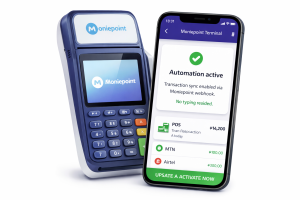
This update means your Moniepoint POS transactions now enter EasyBalance automatically in real-time. By leveraging Moniepoint POS automation via webhook, you no longer have to worry about manual recording or the “night balancing stress” that keeps many agents up late. Whether it is a withdrawal or a transfer, the data flows directly from your terminal to your records.
A Moniepoint terminal next to a smartphone running the EasyBalance app : EasyBalance app interface showing successful Moniepoint POS automation sync.
Why Moniepoint POS Automation Matters for Your Business
Many agents have previously abandoned bookkeeping tools because they simply didn’t have the time to keep up. In the fast-paced world of agency banking, several factors make manual entry a losing battle:
-
Heavy Customer Traffic: When you have a queue, recording transactions is the last thing on your mind.
-
Managing Multiple Locations: It is nearly impossible to track what staff are doing at distant branches without a system.
-
Staff Errors and Omissions: Humans make mistakes; Moniepoint POS automation does not.
-
End-of-Day Shortages: Automation removes the “he-said, she-said” arguments regarding missing funds.
By removing the human error factor, you gain total control over your finances.
What Happens Automatically Now?
Once you activate the webhook, the EasyBalance system takes over the heavy lifting. This isn’t just about recording numbers; it’s about intelligent accounting:
-
Instant Recording: Transactions appear the second they are approved on the POS.
-
Automatic Calculations: Service charges and commissions are computed instantly.
-
Balance Syncing: Your cash-on-hand and terminal balances update in real-time.
-
Profit Reporting: Daily, weekly, monthly, and yearly profits are generated without you lifting a finger.
How to Activate Automation in 7 Steps
Ready to automate your POS bookkeeping? Setting up Moniepoint POS automation is simple:
-
Step 1: Tap to copy Moniepoint Webhook URL from your easybalance account.
-
Step 2: Log in to your Moniepoint dashboard/app
- Step 3: Tap More → Settings → Developer → Webhook => New Subscription
-
Step 4: Paste the webhook link you copied from EasyBalance.
-
Step 5: You will see transaction types → Select All → Submit → Yes / Proceed
- Step 6: On same page, tap Get API Secret
– Copy the secret key
– Go back to EasyBalance
– Paste the key in the Secret Key field
– Tap Submit / Save - Step 7: Update your terminal serial number to the POS account on the easybalance app
The Future of POS Management
While this feature is currently exclusive to Moniepoint terminal users, we are committed to expanding. Integration for other terminals like Opay, Palmpay, and Kuda is coming soon.
The goal of EasyBalance is to help you work on your business, not just in it. Systems scale, but stress doesn’t. Welcome to the future of fully automated bookkeeping.